
跨域及解决方案
跨域:在同源策略的限制下,会阻止非同源下域的内容进行交互
同源策略是一种约定,由Netscape公司1995年引入浏览器,它是浏览器最核心也最基本的安全功能,如果缺少了同源策略,浏览器很容易受到XSS、CSFR等攻击。所谓同源是指"协议+域名+端口"三者相同,即便两个不同的域名指向同一个ip地址,也非同源。
跨域:同协议、域名、端口
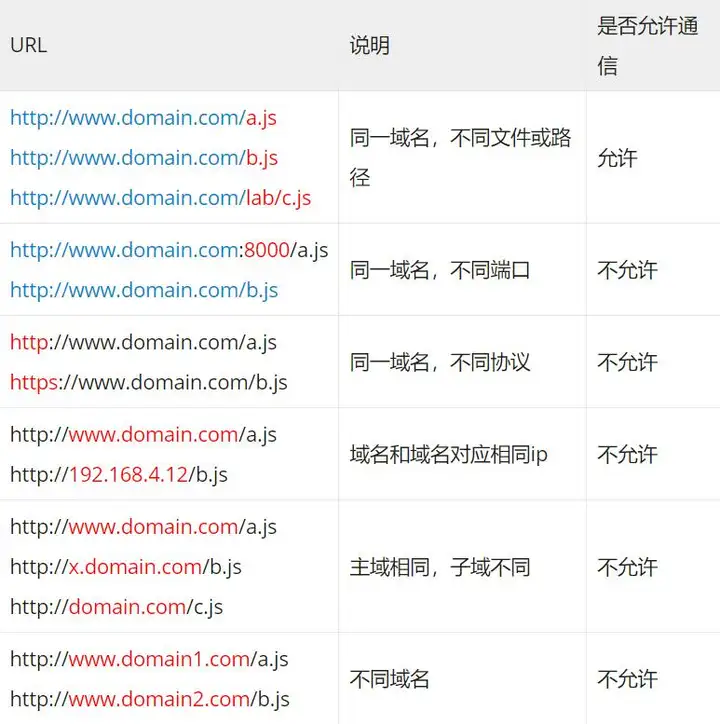
9种常见的前端跨域解决方案(详解) - 知乎 (zhihu.com)
1、JSONP跨域
jsonp的原理就是利用<script>标签没有跨域限制,通过<script>标签src属性,发送带有callback参数的GET请求,服务端将接口返回数据拼凑到callback函数中,返回给浏览器,浏览器解析执行,从而前端拿到callback函数返回的数据。
1)原生JS实现:
text
 <script>
    var script = document.createElement('script');
    script.type = 'text/javascript';

    // 传参一个回调函数名给后端,方便后端返回时执行这个在前端定义的回调函数
    script.src = 'http://www.domain2.com:8080/login?user=admin&callback=handleCallback';
    document.head.appendChild(script);

    // 回调执行函数
    function handleCallback(res) {
        alert(JSON.stringify(res));
    }
</script>服务端返回如下(返回时即执行全局函数):
text
handleCallback({"success": true, "user": "admin"})2)jquery Ajax实现:
text
$.ajax({
    url: 'http://www.domain2.com:8080/login',
    type: 'get',
    dataType: 'jsonp',  // 请求方式为jsonp
    jsonpCallback: "handleCallback",  // 自定义回调函数名
    data: {}
});3)Vue axios实现:
text
this.$http = axios;
this.$http.jsonp('http://www.domain2.com:8080/login', {
    params: {},
    jsonp: 'handleCallback'
}).then((res) => {
    console.log(res);
})后端node.js代码:
text
var querystring = require('querystring');
var http = require('http');
var server = http.createServer();

server.on('request', function(req, res) {
    var params = querystring.parse(req.url.split('?')[1]);
    var fn = params.callback;

    // jsonp返回设置
    res.writeHead(200, { 'Content-Type': 'text/javascript' });
    res.write(fn + '(' + JSON.stringify(params) + ')');

    res.end();
});

server.listen('8080');
console.log('Server is running at port 8080...');jsonp的缺点:只能发送get一种请求
2、跨域资源共享(CORS)
CORS是一个W3C标准,全称是"跨域资源共享"(Cross-origin resource sharing)。 它允许浏览器向跨源服务器,发出XMLHttpRequest请求,从而克服了AJAX只能同源使用的限制。 CORS需要浏览器和服务器同时支持。目前,所有浏览器都支持该功能,IE浏览器不能低于IE10。
前端设置
原生ajax:
js
var xhr = new XMLHttpRequest(); // IE8/9需用window.XDomainRequest兼容

// 前端设置是否带cookie
xhr.withCredentials = true;

xhr.open('post', 'http://www.domain2.com:8080/login', true);
xhr.setRequestHeader('Content-Type', 'application/x-www-form-urlencoded');
xhr.send('user=admin');

xhr.onreadystatechange = function() {
    if (xhr.readyState == 4 && xhr.status == 200) {
        alert(xhr.responseText);
    }
};jquery ajax:
$.ajax({
    ...
   xhrFields: {
       withCredentials: true    // 前端设置是否带cookie
   },
   crossDomain: true,   // 会让请求头中包含跨域的额外信息,但不会含cookie
    ...
});服务端设置
- nodejs代码
js
var http = require('http');
var server = http.createServer();
var qs = require('querystring');

server.on('request', function(req, res) {
    var postData = '';

    // 数据块接收中
    req.addListener('data', function(chunk) {
        postData += chunk;
    });

    // 数据接收完毕
    req.addListener('end', function() {
        postData = qs.parse(postData);

        // 跨域后台设置
        res.writeHead(200, {
            'Access-Control-Allow-Credentials': 'true',     // 后端允许发送Cookie
            'Access-Control-Allow-Origin': 'http://www.domain1.com',    // 允许访问的域(协议+域名+端口)
            /*
             * 此处设置的cookie还是domain2的而非domain1,因为后端也不能跨域写cookie(nginx反向代理可以实现),
             * 但只要domain2中写入一次cookie认证,后面的跨域接口都能从domain2中获取cookie,从而实现所有的接口都能跨域访问
             */
            'Set-Cookie': 'l=a123456;Path=/;Domain=www.domain2.com;HttpOnly'  // HttpOnly的作用是让js无法读取cookie
        });

        res.write(JSON.stringify(postData));
        res.end();
    });
});

server.listen('8080');
console.log('Server is running at port 8080...');3、第三方服务器代理
实现原理:同源策略是浏览器需要遵循的标准,而如果是服务器向服务器请求就无需遵循同源策略。
代理服务器,需要做以下几个步骤:
接受客户端请求 。
将请求 转发给服务器。
拿到服务器 响应 数据。
将 响应 转发给客户端。